Upload an entire chapter at once — ZIP, PDF, folder | yomeru.ai
Drop a ZIP (100 MB max), a PDF, or a folder of images to process a full chapter in one go. Pages queue automatically; processing runs in the background.
Instead of uploading one page at a time, you can send entire chapters or volumes in a single action using ZIP archives, PDFs, or folder uploads.
Auto-naming
When you upload a ZIP or PDF, the folder name in your library is automatically suggested from the filename. A file called one-piece-ch42.zip creates a folder named "one-piece-ch42" that you can rename at any time.
Upload Methods
Package your images into a single ZIP file (up to 100 MB). When you upload it, every image inside is extracted and queued for processing automatically. Only JPG, PNG, and WebP images inside the archive are processed -- other file types are skipped.
Name your image files numerically (001.jpg, 002.jpg, etc.) so they sort in the correct reading order.
Upload a PDF (up to 100 MB) and each page is extracted as a separate image. This is convenient for scanned manga volumes or novel chapters that are already in PDF format. Pages are processed in order and grouped together in your library.
Click Select folder in the upload dialog and choose a folder of images from your computer. All supported image files are queued. Subfolders are flattened into a single list, and unsupported file types are skipped.
How Batch Processing Works
Select your files
Drag a ZIP, PDF, or folder into the upload area, or click Upload and browse for it.
Review the cost
The upload dialog shows how many images were detected and the total credit cost (1 credit per image).
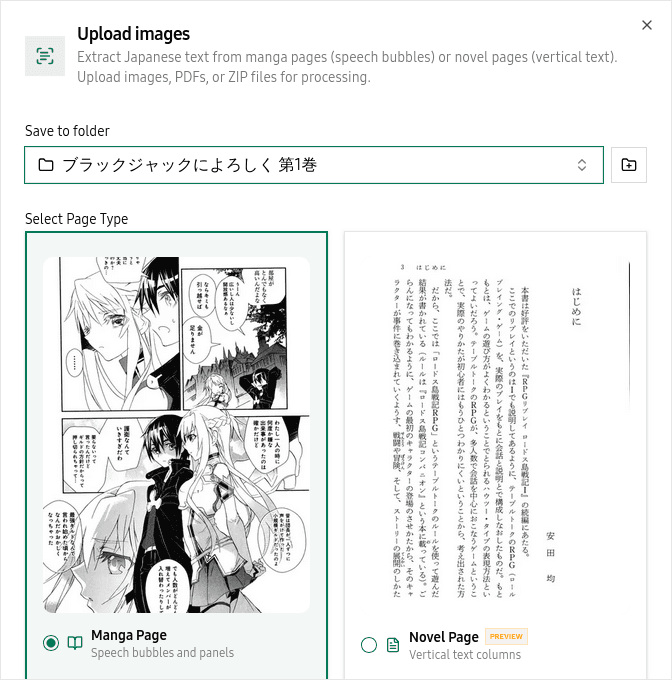 The upload dialog shows detected files, credit cost, and lets you assign a destination folder
Submit and wait
Click Submit. Up to 3 images are processed at the same time; the rest are queued. You can close the browser and come back -- processing continues in the background.
Best Practices
Name your files with leading zeros (001.jpg, 002.jpg) to keep them in the right order. Use consistent image quality across a batch -- mixing high-res and low-res scans can produce uneven results. If you have a large volume, splitting it into chapter-sized ZIPs gives you faster feedback as each batch completes.
Related Pages
Supported formats and how to upload content | yomeru.ai
JPG, PNG, WebP (10 MB max), PDFs and ZIPs up to 100 MB. Choose manga or novel mode before submitting — the dialog shows the credit cost upfront.
Move, delete, and bookmark files in your library | yomeru.ai
Select multiple files, move them between folders, delete pages you no longer need, and bookmark scenes for quick access. Deletion is permanent.