How to look up any Japanese word in the reader | yomeru.ai
Tap any word for an instant popup: furigana reading, English meaning, and part of speech. Save to favorites, explore kanji, or get example sentences.
Looking up words in yomeru.ai is as simple as clicking on them. Every word in the reader is interactive — tap it and you'll see the reading, meaning, and part of speech right away. No copying and pasting into a separate app.
Instant lookups
Basic word lookups require no loading time. Word Lab data is pre-loaded, so definitions appear the moment you click.
How It Works
Click a word
Tap any word in the reader. A popup appears immediately with the word's reading (furigana) and English meaning.
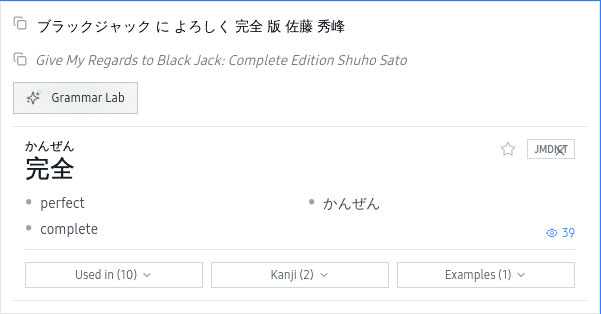 Tap any word in the reader to see its reading and meaning instantly
Read the definition
The popup shows the hiragana reading, English meaning(s), and part of speech. For words with multiple meanings, the most relevant definition appears first.
Take action
Use the quick actions in the popup to go deeper: save to favorites, explore individual kanji, get a grammar explanation, or see example sentences.
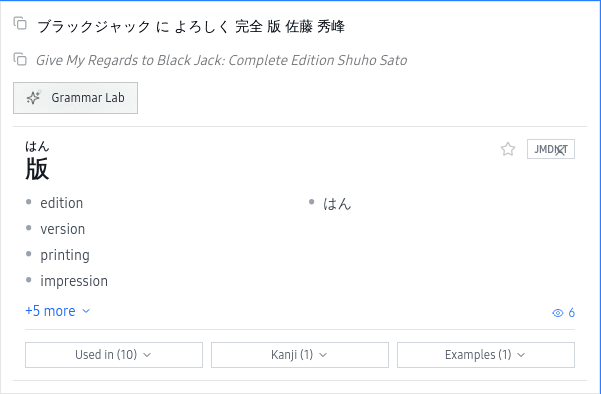 Use quick actions to save to favorites, explore kanji, or see example sentences
Quick Actions
Every word popup gives you a set of actions beyond the basic definition:
- Copy reading — grab the furigana reading to your clipboard
- Save to favorites — bookmark the word for later study
- Explore kanji — jump into detailed kanji breakdowns
- Grammar explanation — get an AI-powered explanation of how the word is used
- Example sentences — see the word used in other contexts
For compound words (熟語), you'll see the full compound definition along with the meanings of each individual kanji. Click any kanji to explore it further.
Related Pages
Word Lab — Japanese dictionary with kanji and examples | yomeru.ai
Click any word while reading for readings, meanings, and POS from JMDict. Explore kanji, save favorites, or get AI entries for out-of-dictionary words.
Word Lab sources — JMDict, KanjiDic, JMnedict | yomeru.ai
Word lookups draw from JMDict (200,000+ entries), KanjiDic (Joyo kanji), JMnedict (730,000+ names), and KRADFILE for radical decomposition.