5 best reading tools for Japanese learners in 2026 | yomeru.ai

Shuhei Nakamura
2026/01/04
Updated: 2026/02/22

Five tools cover the full Japanese reading workflow—from OCR for manga to spaced repetition for vocabulary. Each solves a different problem, and most successful learners use three or four together. This guide reviews each one and shows how they fit into a daily reading practice.
The Reading Proficiency Problem
Reading Japanese well requires exposure to real content, immediate feedback on unknown words, and systematic review. Learners typically need to encounter new vocabulary 7-20 times in context before it sticks -- but when a single lookup takes 30 seconds, most people give up and settle for vague comprehension. Limited vocabulary prevents reading practice, which prevents vocabulary growth.
The tools below break this cycle by reducing lookup friction to near-zero and automating review.
1. Yomeru.ai: AI-Powered OCR for Manga and Beyond
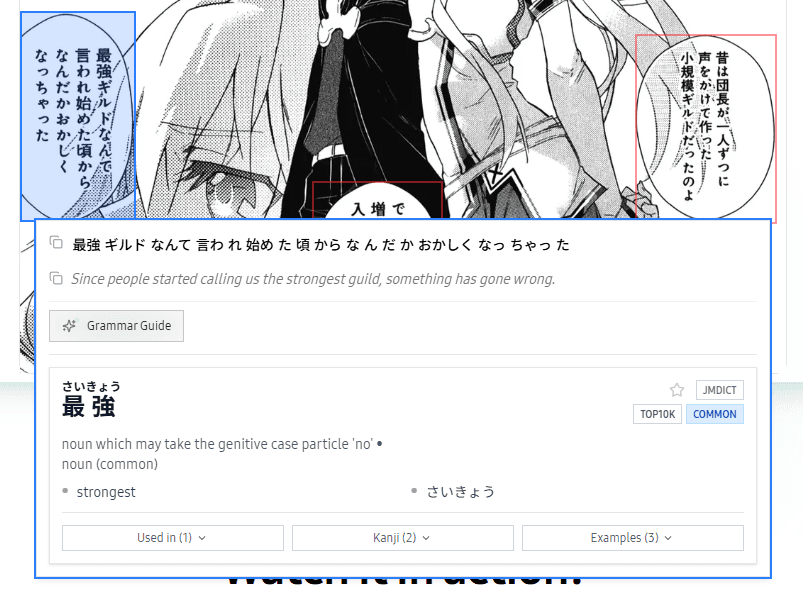 Yomeru.ai offers instant OCR with grammar breakdown
Upload a manga page or novel scan, click any word, and get definitions with grammar breakdowns. Yomeru.ai handles OCR for Japanese text in images—manga panels, light novel pages, and documents. Its morphological analysis identifies verb conjugations, explains particle usage, and breaks down compound words alongside character recognition. It handles vertical text, stylized manga fonts, and low-contrast backgrounds.
Best for: Manga readers, intermediate learners tackling native content, anyone reading physical books without constant dictionary interruptions.
2. Yomitan: The Browser Dictionary That Does Everything
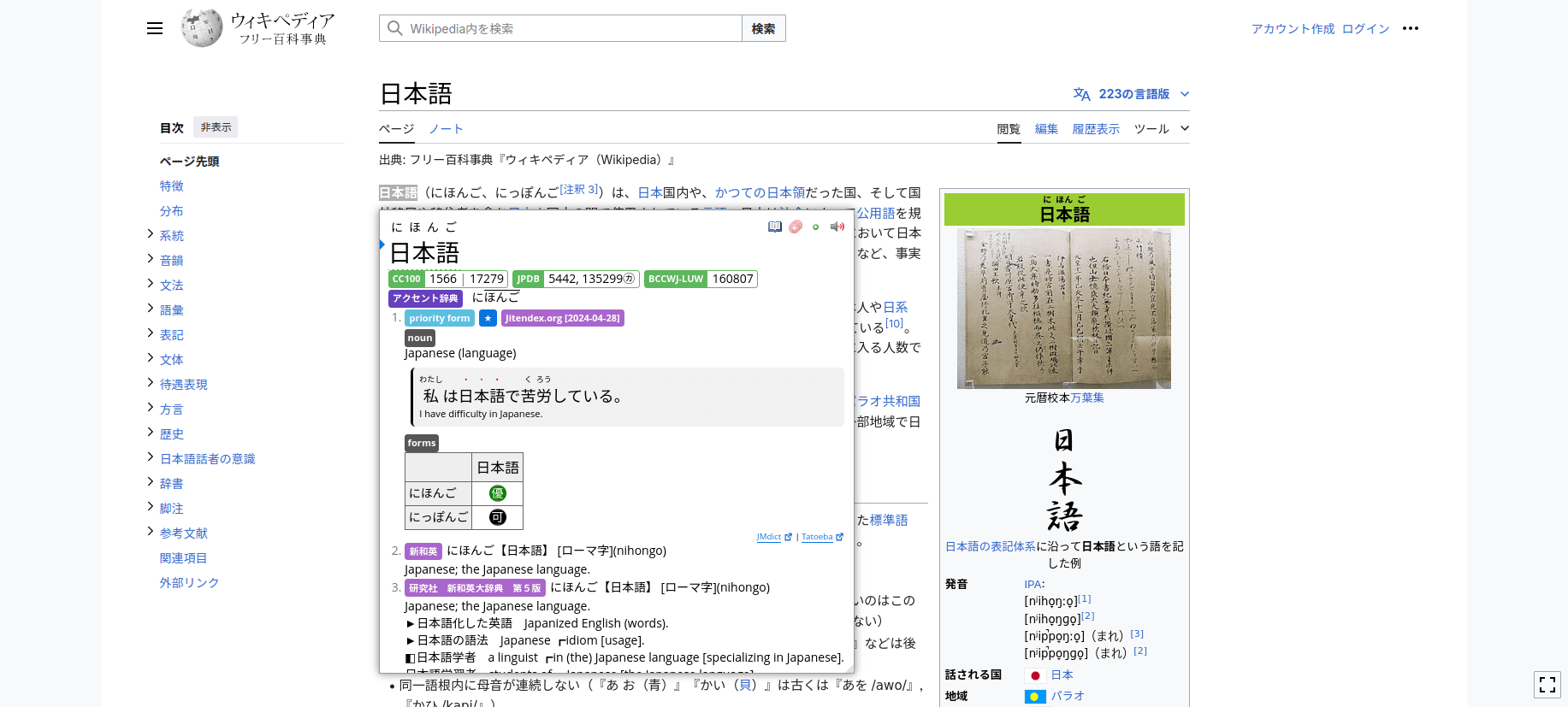 Yomitan provides instant hover-to-lookup dictionary popups with Anki integration
Yomitan is a free, open-source browser extension that turns any Japanese text on your screen into an interactive learning resource. Hover over a word—any word—and get instant dictionary definitions, kanji breakdowns, and pronunciation audio.
The tool supports over 20 languages and works completely offline once you've installed dictionaries. But the real power comes from Anki integration. With a single click, Yomitan creates flashcards for new vocabulary, complete with the source sentence, audio, and context from where you found it.
Key strengths:
- Zero-friction vocabulary lookup (just hover)
- Automatic Anki flashcard creation via AnkiConnect
- Massive dictionary selection (EPWING format support)
- Multiple audio sources for pronunciation
- Completely free and community-driven
Best for: Anyone reading Japanese content online—news sites, Wikipedia, social media, web novels, or browser-based manga readers.
Yomitan replaced the now-defunct Yomichan and continues active development with regular updates. The community has created thousands of compatible dictionaries, from specialized technical terms to regional dialects and internet slang.
3. Satori Reader: Graded Stories That Grow With You
 Satori Reader offers adjustable difficulty with inline grammar breakdowns
Satori Reader solves the "too hard, too easy" problem that plagues most intermediate learners. The platform offers engaging serialized stories at multiple difficulty levels, each with adjustable reading support based on your current knowledge.
Set Satori Reader to show furigana only over kanji you don't know yet. Or display full hiragana text if kanji still overwhelms you. Every article includes inline grammar explanations—click any sentence for detailed breakdowns of its structure.
Key strengths:
- Adjustable text display matches your exact level
- Grammar explanations embedded in reading context
- Native audio for every article (listening practice)
- Built-in SRS for vocabulary review
- New content releases three times weekly
Best for: Intermediate learners (JLPT N4-N3) ready to move beyond textbooks but not yet comfortable with native content.
The platform's usage heatmap tracks your reading consistency, while the study list feature saves vocabulary with full sentence context and audio. This means reviewing vocabulary isn't just flashcard drilling—you're reviewing authentic usage patterns.
Users consistently report that Satori Reader bridges the gap between controlled textbook content and the overwhelming complexity of native materials. The stories cover practical topics (hospital visits, seasonal allergies) alongside entertaining fiction, giving you vocabulary for real-life situations.
Pricing: $9/month with limited free content available.
4. Anki: The SRS Engine Behind Serious Study
 Anki's simple interface powers serious vocabulary acquisition through spaced repetition
Anki doesn't look impressive. The interface feels dated, setup requires patience, and the learning curve is steep. But ask any successful Japanese learner what tools they used, and Anki appears on nearly every list.
Anki implements spaced repetition software (SRS), the learning science principle that schedules reviews right before you're about to forget information. This optimization means you can memorize 2,000+ kanji and 10,000+ vocabulary words without spending every waking hour on review.
Key strengths:
- Extremely powerful and customizable
- Thousands of pre-made Japanese decks available
- Integration with nearly every other tool (Yomitan, WaniKani, Satori Reader)
- Free on desktop and Android ($24.99 on iOS)
- Community add-ons extend functionality infinitely
Best for: Serious learners committed to long-term study, anyone preparing for JLPT exams, learners who want complete control over their study materials.
Popular Japanese decks include Core 2000/6000 (most common words with sentences), Kaishi 1.5k (includes pitch accent), and countless user-generated decks for specific textbooks or content.
The setup effort pays massive dividends. Anki's algorithm ensures you never waste time reviewing what you've already mastered, focusing your energy on vocabulary that needs reinforcement. Most advanced learners credit Anki with 50%+ of their vocabulary acquisition.
5. WaniKani: Kanji Learning That Actually Sticks
 WaniKani uses radicals and mnemonics to make kanji memorable
WaniKani teaches kanji through a carefully designed progression system using mnemonics and radicals. Instead of memorizing thousands of seemingly random characters, you learn building blocks (radicals), combine them into kanji, then learn vocabulary using those kanji.
The system spans 60 levels and teaches approximately 2,055 kanji and 6,386 vocabulary words. While completing all levels takes about a year of daily consistency, the structure makes kanji learning feel achievable rather than overwhelming.
Key strengths:
- Excellent mnemonic stories for retention
- Clear progression path (never wonder what to study next)
- Gamified with levels and unlocks
- Active community for support and discussion
- Vocabulary tied directly to kanji you've learned
Best for: Beginners to intermediate learners who need structured kanji instruction, visual learners who respond well to mnemonics, anyone who finds kanji the most intimidating part of Japanese.
WaniKani doesn't teach grammar or conversation skills—it focuses exclusively on kanji and vocabulary. This specialization makes it incredibly effective at what it does. Users consistently report that WaniKani turns kanji from an insurmountable barrier into a manageable, even enjoyable, challenge.
The first three levels are free, letting you test whether the approach works for your learning style. After that, subscriptions start at $9/month or $299 for lifetime access.
Feature Comparison: How These Tools Work Together
| Feature | Yomeru.ai | Yomitan | Satori Reader | Anki | WaniKani |
|---|---|---|---|---|---|
| OCR for Images | ✅ Full | ❌ | ❌ | ❌ | ❌ |
| Manga Support | ✅ Native | ⚠️ With Mokuro | ❌ | ❌ | ❌ |
| Browser Dictionary | ⚠️ Web-based | ✅ Extension | ⚠️ Built-in | ❌ | ❌ |
| Spaced Repetition | ⚠️ Basic | ⚠️ Via Anki | ✅ Built-in | ✅ Core feature | ✅ Core feature |
| Grammar Explanations | ✅ AI-powered | ❌ | ✅ Detailed | ❌ | ❌ |
| Anki Integration | ⚠️ Export | ✅ Automatic | ⚠️ Manual | N/A | ⚠️ Community decks |
| Offline Mode | ❌ | ✅ Full | ⚠️ Download | ✅ Full | ❌ |
| Price | Free tier + paid | Free | $9/month | Free (iOS $25) | $9/month or $299 lifetime |
| Best For | Manga/image text | Web reading | Graded stories | Vocabulary SRS | Kanji mastery |
These tools complement rather than compete with each other. A powerful workflow combines several:
- Yomeru.ai for reading manga and processing images
- Yomitan for looking up words in web content
- Anki as the central review engine
- Satori Reader for structured reading practice
- WaniKani for systematic kanji learning (especially for beginners)
This combination covers every aspect of reading proficiency: exposure to real content, instant lookup for comprehension, systematic review for retention, and structured learning for foundations.
Building Your Japanese Reading Workflow
You don't need all five tools on day one. Start with one based on your level: WaniKani for complete beginners building kanji recognition, or Yomitan/Yomeru.ai for intermediate learners ready to read. Add Anki with a pre-made deck (Core 2000 or Kaishi 1.5k) within the first few weeks, then layer in Satori Reader when you want structured practice. For finding manga and other reading material, see our guide to getting Japanese sources. The goal is a sustainable daily routine, not mastering every feature at once.
For the science behind reading-based language acquisition, see why reading is the key to Japanese mastery.
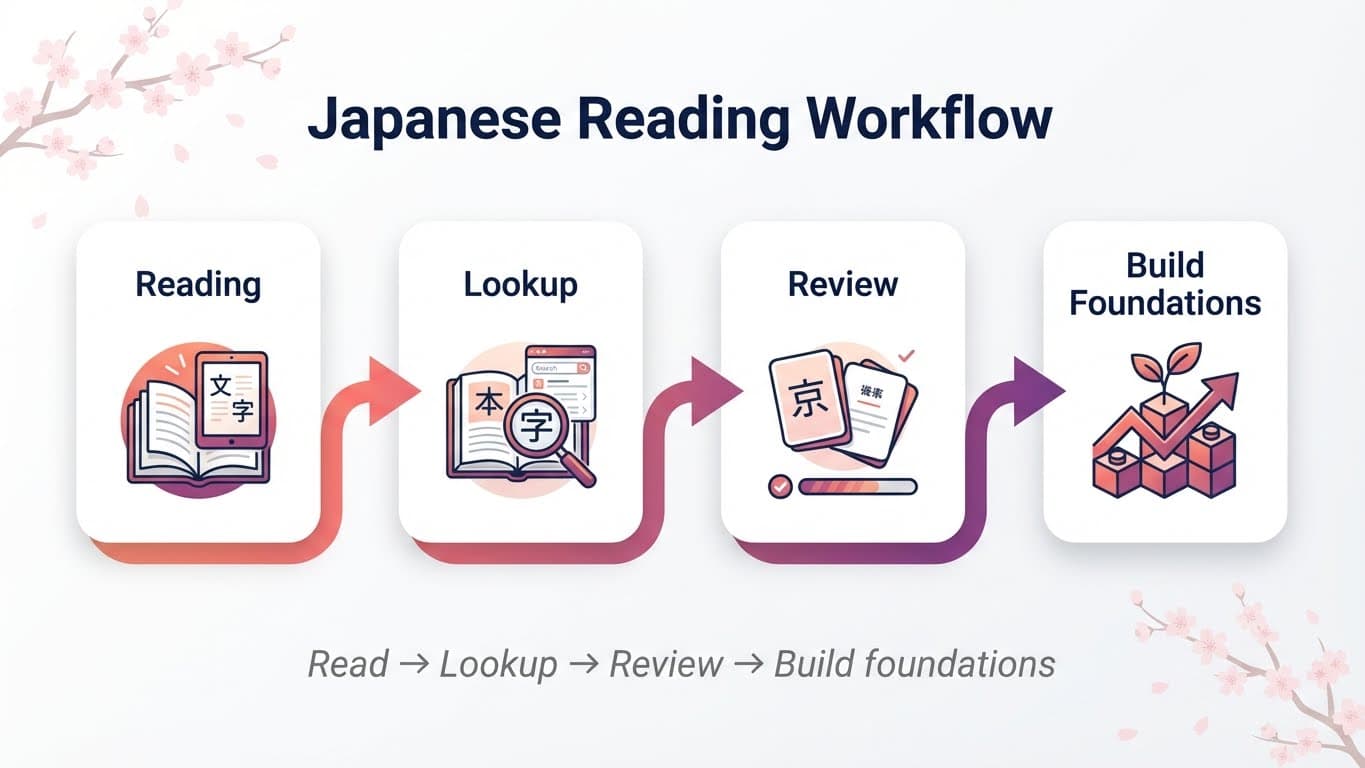 How the five tools work together: Reading → Lookup → Review → Build foundations
For how reading connects to listening comprehension, see our guide to building Japanese proficiency.
Frequently Asked Questions
Start Reading Today
Pick one tool and use it today. Install Yomitan and read a Japanese Wikipedia article, or sign up for Yomeru.ai and process a manga page, or open Anki and review ten cards. Add more tools as your needs become clear.
Written by
Shuhei Nakamura
Japanese Language Educator
A Japanese language educator with over 15 years of teaching experience, Shuhei specializes in reading-focused approaches to language acquisition. Drawing from his background in applied linguistics and immersive learning methods, he writes about practical strategies that help learners build real fluency through extensive reading and native content.