Japanese.io alternative for manga and novel reading | yomeru.ai

Shuhei Nakamura
2025/12/31
Updated: 2026/02/22
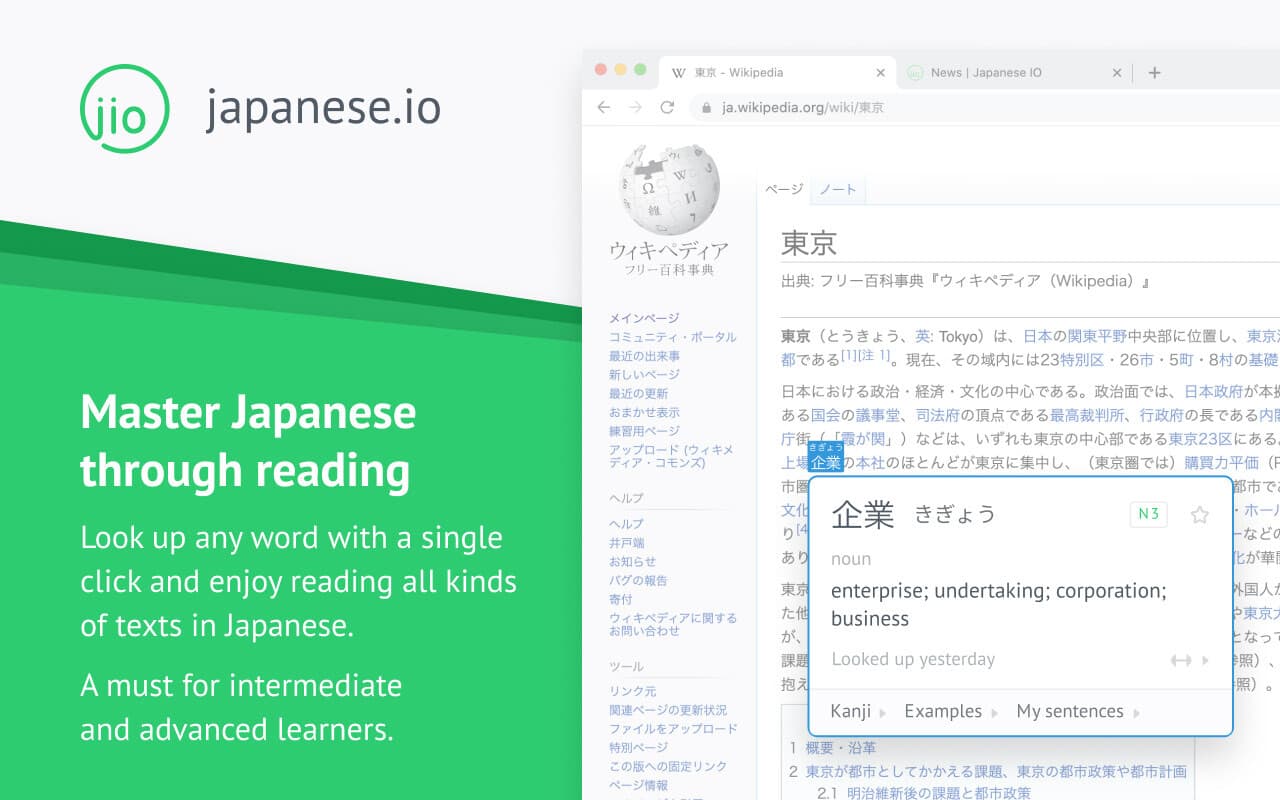
If you're reading Japanese online, you probably already know Japanese.io. The browser extension is genuinely excellent—hover over any word on a Japanese website and get instant definitions. The vocabulary tracking helps you build a personal word bank. For web-based reading, it's hard to beat.
But then you pick up a manga volume. Or open a light novel with complex kanji. And suddenly that beautiful browser extension can't help you—because there's no selectable text, or the text needs more than a simple dictionary lookup.
This is where AI-powered reading assistance comes in. Yomeru.ai makes manga and novels genuinely readable at any level—with features specifically designed to accelerate learning, not just provide translations.
| Use Case | Best Tool |
|---|---|
| Web articles, news, blogs | Japanese.io |
| Manga, comics, scans | Yomeru.ai |
| Light novels and literature | Yomeru.ai |
| Physical books, photos | Yomeru.ai |
Quick decision: Primarily reading web content (news, Wikipedia, Twitter)? Japanese.io. Reading manga, novels, or physical books? Yomeru.ai.
What Japanese.io Does Well
Let's be clear about Japanese.io's strengths—they're real:
Seamless browser integration. The extension works everywhere. NHK News, Twitter, Wikipedia, web novels. No copying text, no switching apps. Just hover and read.
Vocabulary building. Words you look up get saved. You can review them later, track your progress, see which words keep tripping you up. This kind of spaced exposure matters for retention.
Clean, fast lookups. The dictionary is good, the interface is polished, and the experience feels native to how you already browse the web.
If web reading is your primary study method, Japanese.io is excellent. Many learners use it daily for years.
Where Extensions Hit Their Limits
Browser extensions require one thing: selectable text in your browser. That's fine for about 20% of what intermediate learners want to read. The other 80% is images, physical books, and content that needs deeper analysis than a dictionary popup.
You pick up a One Piece volume. You photograph a restaurant menu in Tokyo. The browser extension can't see any of it.
What extensions can't fully support:
- Physical manga volumes and light novels
- Digital manga (DRM-protected or image-based)
- Complex literary vocabulary requiring context
- Grammar patterns that need explanation, not just translation
- Signs, menus, packaging
Japanese.io does offer OCR Vision on their Power plan ($10/month), which handles some image content. But it requires manual text selection—you draw boxes around what you want to read. For manga with dozens of speech bubbles per page, or novels where you need grammar support, that workflow falls short.
How Yomeru.ai Makes Reading Accessible
Yomeru.ai is built as a comprehensive AI reading assistant. Whether you're tackling manga panels or working through a novel, it provides the support that makes authentic Japanese content readable:
For Manga: Automatic speech bubble detection. Upload a page and the system identifies text regions automatically, preserving Japanese reading order (right-to-left, top-to-bottom). No manual selection required—just upload and start reading.
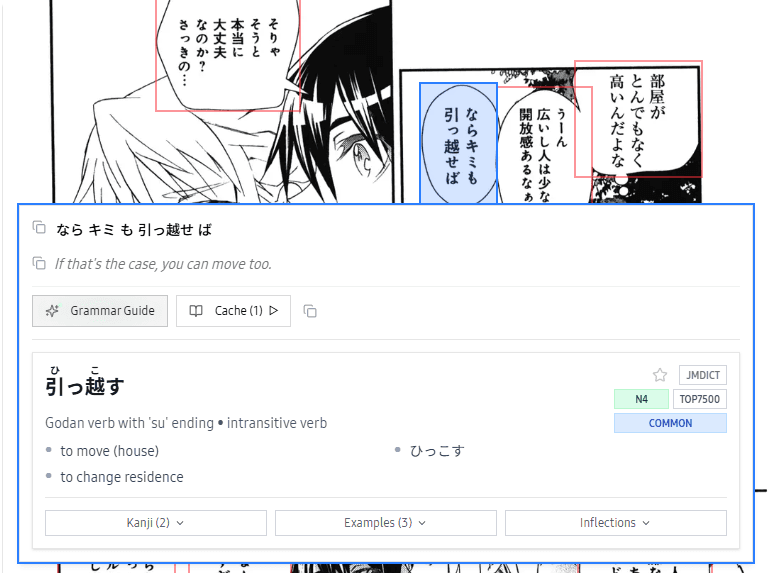 Speech bubbles detected automatically—no manual selection needed
Morphological analysis. Every sentence breaks down into its components—verb stems, conjugations, particles, compound words. You don't just see what text means, you understand how it's constructed.
User dictionary for gaps. Manga uses slang, novels use literary vocabulary, and both include character names that standard dictionaries miss. Create custom entries for anything the dictionary doesn't know.
The Kontext Advantage
This is where Yomeru.ai fundamentally differs from dictionary-based tools. Click any word and you don't just get a definition—you get real examples from Kontext's curated database of native Japanese sentences.
Why does this matter? Dictionary definitions tell you what a word means. Kontext examples show you how native speakers actually use it. You see the word in natural contexts: formal vs casual, written vs spoken, literary vs colloquial.
In a manga panel, a character says 気になる about a classmate. A dictionary gives you "to be concerned about." But Kontext shows you the word in context across dozens of real sentences: romantic interest ("あの人が気になる"), casual curiosity ("ちょっと気になるんだけど"), and genuine worry ("最近の成績が気になる"). You immediately understand the character means "I'm interested in them"—not "I'm worried about them."
 Real sentences from native sources—not textbook examples
This turns lookups from "what does this mean?" into "how do Japanese speakers actually use this?" -- the difference between translation and learning.
AI-Generated Examples That Accelerate Learning
Sometimes Kontext doesn't have an example for the exact usage you need. Yomeru.ai fills this gap with AI-generated sentences tailored to the word you're studying. Click any word, request examples, and the system generates natural usage patterns that get saved and shared with other learners.
These aren't generic translations. The sentences show how words function across registers -- polite vs casual, questions vs statements, different grammatical patterns. You see the word in action rather than just reading a definition.
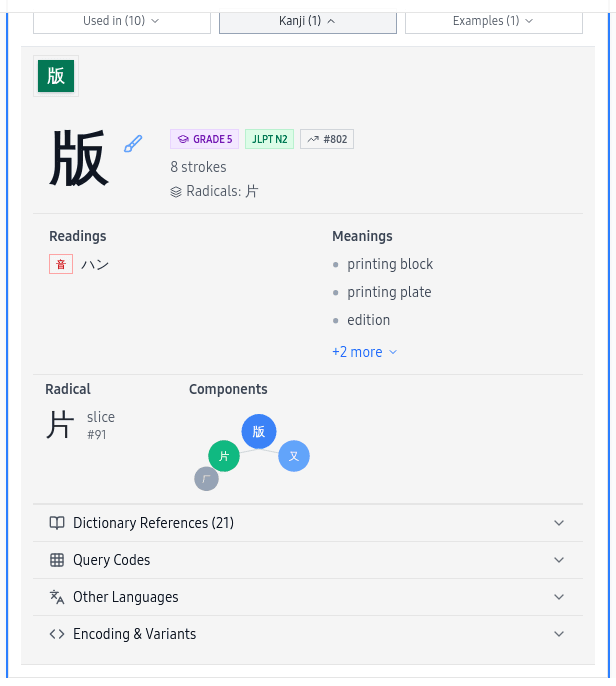 Tap any kanji to explore readings, radicals, stroke order, and common compounds
Feature Comparison
Where Japanese.io Excels
| Feature | What You Get |
|---|---|
| Browser extension | Hover-to-lookup on any website |
| Web reading | Seamless NHK, Twitter, Wikipedia support |
| Vocabulary tracking | Built-in word bank with review |
Where Yomeru.ai Excels
| Feature | What You Get |
|---|---|
| Manga OCR | Auto-detect speech bubbles, no manual selection |
| Novels & literature | Full grammar breakdown, not just definitions |
| Physical books | Photo upload from phone camera |
| Kontext integration | Real sentences from native Japanese sources |
| AI examples | On-demand usage sentences for any word |
| Morphological analysis | AI-powered conjugation and particle breakdown |
| User dictionary | Add slang, names, and missing vocabulary |
Pricing
| Plan | Japanese.io | Yomeru.ai |
|---|---|---|
| Free | Limited lookups | 500 pages/month |
| Paid | $10/month (Power) | $7/month |
For a broader comparison including more tools, see our full reading tools roundup.
For a detailed OCR comparison with Mokuro, see our Mokuro alternative guide.
How to Get Started with Yomeru.ai
- Upload your content — Manga pages, novel text, photos of physical books (JPG, PNG, PDF, ZIP)
- Automatic processing — Text regions detected and extracted in reading order
- Click any word — Word lookups, Kontext examples, grammar explanations
- Generate examples — AI-generated sentences for unfamiliar words
- Build custom entries — Add slang, names, or vocabulary the dictionary misses
Processing takes 5-15 seconds per page. Vertical text, furigana, and various font styles all work.
Frequently Asked Questions
Written by
Shuhei Nakamura
Japanese Language Educator
A Japanese language educator with over 15 years of teaching experience, Shuhei specializes in reading-focused approaches to language acquisition. Drawing from his background in applied linguistics and immersive learning methods, he writes about practical strategies that help learners build real fluency through extensive reading and native content.