Japanese learning MCP — JMDict and grammar for ChatGPT | yomeru.ai

Shuhei Nakamura
2026/05/04
The Japanese language has the best free dictionary data of any language on the planet. JMDict has roughly 200,000 entries with JLPT levels, frequency rankings, parts of speech, and inflection codes. Tatoeba has millions of human-translated example sentences. KanjiVG has stroke-order paths for every Jōyō kanji. JMnedict covers proper nouns. And until recently, all of that was scattered across half a dozen different apps that didn't talk to each other — and certainly didn't talk to your AI.
The yomeru.ai Japanese Language MCP changes that. One endpoint. Four tools. Every primary Japanese-language data source, callable from ChatGPT, Claude, Claude Code, and Codex.
The Sources, Finally Piped
Most "Japanese AI" tools are either thin wrappers around a single dictionary or they ask the model to invent definitions and hope nobody checks. Both end the same way: subtly wrong answers, given confidently.
The MCP solves that by piping the canonical sources directly:
- JMDict — ~200k word entries, JLPT levels, frequency ranks, common-word flags, and full part-of-speech codes. The de facto standard Japanese-English dictionary.
- JMnedict — Proper nouns: people, places, companies, fictional characters. The piece JMDict deliberately leaves out.
- Tatoeba — Human-translated example sentences, one of the few large corpora that's actually been read by humans before being published.
- KanjiVG stroke order — SVG paths for every kanji, viewBox-aligned, ready to render.
- A Japanese-tuned LLM fallback — for words outside the dictionaries: neologisms, slang, technical jargon, region-specific vocabulary. Tagged so the assistant knows the provenance and can flag it to the learner.
This is the same data spine that powers serious Japanese-learning apps. The difference is now you can call it from inside the assistant you already use, rather than tab-switching to a dictionary every twelve seconds.
The Four Tools
The MCP exposes four tools. The mental model is two scopes — word, sentence — crossed with two priorities — fast cached, or deep and slow.
word_lab— Single-word dictionary lookup. Returns readings, JLPT level, frequency rank, every meaning with parts of speech, kanji breakdowns with stroke-order SVG paths, example sentences, and compound words. One call gets the whole card.grammar_lab_fast— Default sentence breakdown. Identifies every grammar point, names the verb conjugations, explains the particles. Plus a fullvocabulary[]array withword_lab-style entries for every word in the sentence — no extra calls needed for follow-up questions. Sub-second on the cache.grammar_lab— The deep variant. Same output shape, slower model, used when the fast one returns shallow analysis on a complex or rare construction.example_sentences— Examples-only. 1–5 sentences per word, sources tagged (tatoeba,jmdict, orai_generated). Use it when you want examples without the rest of the dictionary card.
Full tool reference and arguments live in the MCP docs. Setup paths for every client live on the MCP page.
Add It to Your AI
The endpoint is https://yomeru.ai/api/mcp. Anonymous, free, rate-limited. No auth setup. Streamable HTTP transport.
ChatGPT — Custom MCP
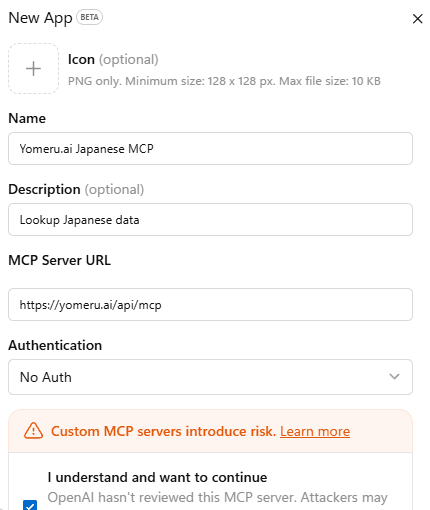
Open Settings → Custom MCP → New App. Paste https://yomeru.ai/api/mcp as the server URL. Authentication stays on No Auth. Tick the risk acknowledgement and save.
Claude — Add Custom Connector
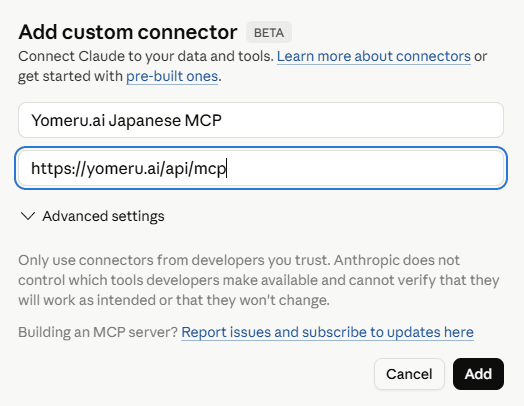
In Claude Settings, go to Connectors → Add custom connector. Two fields: a name and the URL. Paste https://yomeru.ai/api/mcp. Click Add.
Claude Code — One Command
claude mcp add --transport http yomeru https://yomeru.ai/api/mcpThe four tools auto-appear in your next session.
Codex — Same Idea
codex mcp add yomeru --url https://yomeru.ai/api/mcpVerify with codex mcp list.
The Skill — Make Claude Render Real Cards
Here's the part that turned out unexpectedly interesting.
By default, when an MCP tool returns structured JSON, Claude tends to summarize it as bullet points or — worse — dump the raw JSON back into the chat. Both lose the typography that makes a dictionary card useful: kanji big enough to read, JLPT level as a pill, stroke order as an actual rendered SVG.
The fix is a Skill — a small markdown file that teaches Claude how to display the payload rather than just call the tool. Drop it in once and every subsequent word_lab call comes back as a properly typeset dictionary card with emerald-accented JLPT pills, kanji at display weight, stroke-order SVGs rendered from KanjiVG paths, and a clickable vocabulary grid.
What the skill unlocks:
- Rendered stroke-order glyphs — KanjiVG paths drawn in-chat, with optional animated draw-on for
prefers-reduced-motion: no-preferenceusers. - Branded dictionary cards — emerald accents, sharp corners, Samsung Sharp Sans display heads, neutral chrome. The same look used on yomeru.ai itself.
- Inline grammar breakdowns — sentence parts in a styled table, WordType pills colored by category, vocabulary cards rendered from the embedded
vocabulary[]array. - Zero extra MCP calls — the skill teaches Claude to read everything it needs from the single tool response, including all the kanji and example data.
You can download the skill file directly:
Drop it into ~/Library/Application Support/Claude/skills/ on macOS or %APPDATA%\Claude\skills\ on Windows. Claude Code: mkdir -p .claude/skills && curl -sL https://yomeru.ai/skills/yomeru-japanese-skill.md -o .claude/skills/yomeru-japanese.md. Codex: drop into your project's skills directory and reference from your system prompt.
Why This Matters for Learners
The lookup tax is the silent killer of reading practice. Every time you stop reading to switch tabs, type a word into a dictionary, scroll past the romanization to find the sense you actually need, copy back into your text — that's anywhere from twenty to ninety seconds of context-switching for one word. Multiply by every unknown word on a page of native manga and you understand why most learners settle for vague comprehension instead.
Inline lookups inside the AI you're already talking to are not a small improvement. They're a categorical one. The lookup loop becomes:
- Hover or quote the word.
- Tool call. Card renders inline.
- Keep reading.
No tab switch. No friction. The same JMDict + Tatoeba spine that powers every serious Japanese-learning app, just a tool call away.
For grammar, the same logic applies — except the gain is bigger, because grammar lookups are slower and more error-prone. grammar_lab_fast returns a full sentence breakdown with named patterns, vocabulary, and translation in one call, structured so the assistant can surface follow-up details without going back to the network.
Try It
- Sign up for higher MCP allowances (anonymous use stays free): yomeru.ai/auth/signup
- Setup paths for every client (ChatGPT, Claude, Claude Code, Codex): /en/what-is-mcp
- Skill file for branded dictionary cards in Claude: /skills/yomeru-japanese-skill.md
- Tool docs with arguments and response shapes: /en/docs/learning-tools/mcp
The MCP is brand new and free for everyone today — anonymous, free-account, and paid-plan users get the same generous rate limits while we figure out where the ceilings need to be. If you find a sentence that confuses grammar_lab_fast or a word the AI fallback flubs, tell us. The whole point of piping canonical sources is that we can fix the wrong answers instead of arguing about them.
Written by
Shuhei Nakamura
Japanese Language Educator
A Japanese language educator with over 15 years of teaching experience, Shuhei specializes in reading-focused approaches to language acquisition. Drawing from his background in applied linguistics and immersive learning methods, he writes about practical strategies that help learners build real fluency through extensive reading and native content.